Home

Showing posts with label Lập Trình. Show all posts

Monday, March 12, 2012

Download Free Metro Style Icons


Windows phone 7 and Windows 8 icons are so cool. Microsoft called their new UI as “Metro”. The interface look really nice and the icons used in the Metro interface are simple but look nice too.

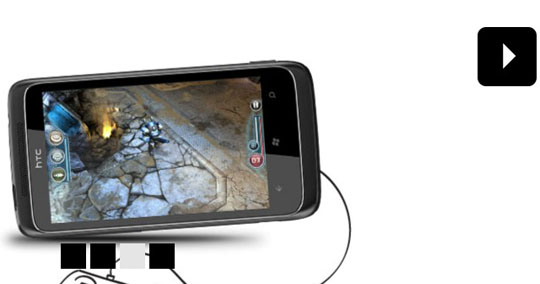
This one is a free set of icons that inspired by the icons that was used in Windows phone 7 and Windows 8 Metro style.

The icon set available for free download and you are free to use or modify these icons for whatever you want.

Metro style icons

Link: Free Metro Style Icon Set

Friday, April 29, 2011

Do’s and Don’ts of Writing Better CSS and HTML

CSS and HTML are key languages to begin with, when you decide to invest your time in web design and development. They are powerful languages and most of the time may seem simple to work with.

However, every single one of us, beginners, or advanced developers, have committed basic or major mistakes working with both these languages. With this in mind, I believe it is extremely important and always welcome to learn some good tips and practices which I hope will help you improve your skills and experience.

CSS/HTML - How you usually do and how you should do it

Saturday, March 12, 2011

Standalone & Feature Rich JavaScript Modal Windows – TinyBox2

These day I was stuck in using ModalPopupExtender control of ASP.NET to display Youtube Embed video window. It seem to work perfectly in IE and FF, but not Safari on Mac PC. I suddenly found this post on webresourcedepot.com and may be I will try to use in my website. If anyone has used it for that purpose please leave a comment to me!

TinyBox2 is the successor of the previously published resource TinyBox which is a standalone JavaScript modal windows library.

The library is lightweight (5kb) and supports images, iframes, HTML and Ajax requests natively.

TinyBox2

Modal windows are very flexible with the options like toggle animation, auto-hide, opacity level, custom positions and more.

And, they can be closed by simply clicking on the close button, anywhere outside the modal box or ESC.

There are callback functions for the open + close events and the windows can be set to load in a specific size or the width/height (auto) of the content to be displayed.

Requirements: No Requirements
Compatibility: Tested in IE7+, FF, Chrome, Opera, and Safari
Website: http://www.scriptiny.com/2011/03/javascript-modal-wi...
Demo: http://sandbox.scriptiny.com/tinybox2/

Saturday, March 5, 2011

Sure Shot Tips to Optimize Your Website’s Speed

How much time a website takes to load is a very important factor which determines the success of a website to a large extent. If a website takes too much time to load, it is bound to lose a majority of visitors and potential customers. When it comes to search engine parameters, website speed is a crucial factor which determines the search engine ranking. It is important to take everything into consideration when optimizing your website’s speed and availing the services of a qualified web development company is always beneficial. Discussed below are 10 sure shot tips to optimize your website’s speed.

Friday, March 4, 2011

10 Fresh jQuery Image Gallery/Slider Plugins and Tutorials Worth a Look

In the last few years jquery image sliders and jQuery image galleries become very popular in blogs and especially in portfolio sites.One of the easiest solution to attract your visitors and to show your potential clients your portfolio is the image sliders and image galleries.


Today we bring together jQuery image sliders and galleries which are released in the last few months or updated recently.
More Image Sliders and Galleries With jQuery
  

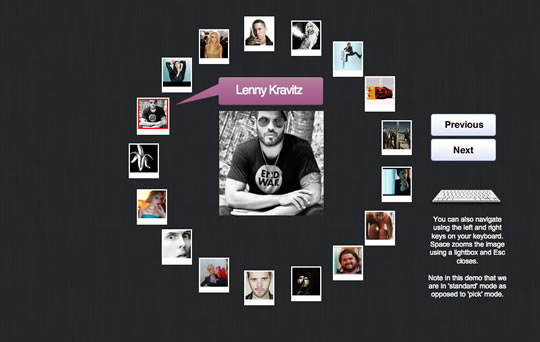
Circular Image Galleries With jQuery
Display your images or items around a shape like a circle or an ellipse.

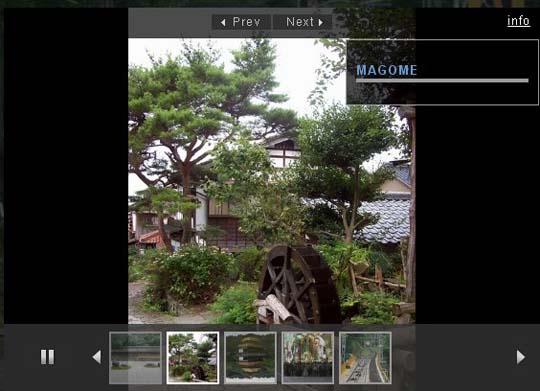
JQuery Image Gallery with Captions and Auto Play/Pause Rotation

An awesome jquery gallery which is transparent, fixed on screen, autoplay on/off buttons and css3 stylized gallery.


JQuery Based Flipped Image Gallery with Bounce Effects

A simple jQuery based flipped image gallery. On hover the images will expand.


Tiny Circle Slider

Tiny Circleslider is a circular slider / carousel.Tiny Circleslider can blend in on any web page.


Awesome Scrolling Navigation using jQuery

The main thing flipboard do differently is to have the logo and logo background elements move at different animation speeds from each other and the main content


Rotating Image Slideshow w/ CSS3 and jQuery

You can use it to spice up your web sites, product pages and other projects with some CSS3 magic.


A Flickr-powered Slideshow

A jQuery plugin that will make it easy to create slideshows, product guides or presentations from your Flickr photo sets. The plugin will be using Flickr’s APIs and YQL to fetch the photos in the sets, after which it will create the markup of the slideshow and listen for events.


Awesome jQuery Image Gallery Plugin(Thumbox)

Browse the images via mini-gallery.Display images description.Effects for input and output images.Keyboard navigation.Navigation with the mouse wheel.


jbgallery 3.0(Big Multiple Images Slideshow With JQuery)

jbgallery is a UI widget webpage written in javascript on top of the jQuery library.Its function is to show a single big image, multiple images, multiple galleries, slideshows, as a site’s background, in a “dialog” mode or as a common pop-up.


Lightweight Thumbnails Image Gallery

Galleria is a JavaScript image gallery framework built on top of the jQuery library. The aim is to simplify the process of creating professional image galleries for the web and mobile devices

Source: http://www.queness.com

Thursday, February 24, 2011

File Upload not Working on First PostBack after loading Async through ASP.NET UpdatePanel

I was setting up a ASP.NET Wizard control.  The 3rd or 4th step had a file upload control on it, with a runat="server".  The entire wizard control I wrapped in an ASP.NET UpdatePanel so that the wizard was all AJAXified.  I had already fixed the "next" button for this wizard step so that it did a full postback to the server, not an asynchronous one - since I knew that was required to get a file upload to the server.  However, the file was STILL not being posted back, atleast not on the first post.  Subsequent posts would work fine.  On a whim, I looked at the Firebug console to inspect the details of the request while it was in progress (Set a breakpoint in your code somewhere, then look at the Firebug console -- you'll see a "POST" entry with info about what was posted, headers for the request, etc).  Below the POST entry, I saw a warning/error message I had never seen before:
 This page has a file upload.  However, the form tag does not have both the enctype=multipart/form-data and method=POST attributes.  The file will not be uploaded.
Hmm...  I thought about it a bit, and then looked at a normal page I had that had file upload controls on it.  Sure enough, the form tag (there is always just one in ASP.NET) had the enctype attribute set automagically by ASP.NET if ASP.NET knew there was a file upload control on the page.  Otherwise, it leaves it off.  The Async update by the UpdatePanel was loading the FileUpload ok, but wasn't adding the enctype=multipart/form-data to the form tag attributes. 
Solution: manually add the enctype to the page's form on Page_Load()

                                                             
 Page.Form.Attributes.Add("enctype", "multipart/form-data"); 
                                                             

Source: http://blog.anofsinger.com/

Monday, February 21, 2011

ASP.NET Tip: Creating Paging for a Repeater Control

There are many ways to page data in a DataList control or Repeater control in ASP.NET. But I think the following solution is the easiest way to create a custom paging when working with a DataList or a Repeater control. You can modify to have the "Next" and "Previous" button as well as styling the current page number easily. This article is from http://itmanagement.earthweb.com and I hope it will help you sometimes!

A common question is "How do I implement paging within a Repeater?" Although the beauty of the Repeater control is its flexibility, you're on your own for building most functions. ASP.NET 2.0 has included some new controls that provide paging, as does the DataGrid in ASP.NET 1.1. However, this tip shows you how to roll your own paging for a simple data viewer.
Here's the code behind for the page this tip builds:
using System;
using System.Data;
using System.Collections;
using System.Web;
using System.Web.UI;
using System.Web.UI.WebControls;
using System.Web.UI.WebControls.WebParts;
using System.Web.UI.HtmlControls;
using System.Data.SqlClient;

Monday, February 14, 2011

ASP.NET 2.0 - Enter Key - Default Submit Button

A very simple and helpful tip from forum.asp.net
One of the most annoying things in developing web pages is handling the "Enter key" for form submission. Enter key has been the favorite way users like to submit forms. Though we provide Buttons to click on, the easiest and intuitive way is that, I can enter some text, make some changes and then hit "Enter" to accomplish my submission.


Friday, February 11, 2011

The Problem with Web Fonts

These day I'm stuck with the design for my current project due to lack of beautiful fonts for website. So I dug around and find this article on http://tympanus.net . This is not a new problem but sometimes we have to waste time in doing this. And then I find it very interesting to see my website with some amazing fonts by using @font-face with many font kits provided on Font Squirrel. That's it! No more words, check it out!
The problem with web fonts is that nobody wants to use the ‘safe’ fonts and you need as much live text on your site as possible. So what’s a designer to do? Fortunately or unfortunately there are plenty of options.
Unique fonts are awesome and up until a year or two ago the only way to accomplish unique typography was to embed them in images on your site. As semantic markup becomes moreimportant to browser compatibility and search engine rankings, live text is more and moreimportant also.
This means that we need to master the art of web fonts and how to get them to render correctly. There is no one real rock-solid sure fire way to present unique fonts yet, but there are a lot of methods you can use to accomplish unique active type. I have tried a few different methods, but my favorites are:

Wednesday, November 24, 2010

Meta Search Engine – Máy tìm kiếm liên hợp


Đã làm công việc này từ 2 năm nay nhưng thật tình là mình vẫn chưa có được những kiến thức sâu hơn công việc của mình. Đôi khi thấy chính những thờ ơ trong việc tìm hiểu về những kiến thức công nghệ mà khiến cho mình bị tụt lại phía sau rất nhiều. Bây giờ phải bắt đầu để ý hơn tới những gì mình đang làm và suy nghĩ về những gì mình nên tìm hiểu cho sau này. Bài viết này lấy từ vietseo.net và nó giới thiệu một cách khá cụ thể về meta search engine, mình cũng đang làm trong dự án này của Howsimple.

Số lượng máy tìm kiếm có thể cạnh tranh với Google chỉ có thể đếm trên đầu ngón tay. Khi không thể cạnh tranh theo kiểu “trực diện”, meta search engine – tạm dịch là máy tìm kiếm liên hợp – là một giải pháp mà nhiều người muốn nhắm đến.

Một máy tìm kiếm (search engine)1 thường có 3 thành phần chính:

  • Thứ nhất là web crawling, thành phần chuyên thu thập các trang web có trên Internet;
  • Thứ hai là indexing, thành phần rút trích các đặc trưng của các trang web (ví dụ tiêu đề, từ khóa tiêu biểu) và lưu trữ vào cơ sở dữ liệu để phục vụ cho nhu cầu tìm kiếm sau này;
  • Thứ ba là searching, thành phần tìm các trang web phù hợp/liên quan đến nhu cầu của người dùng (thông qua việc gõ vào các từ khóa trong ô tìm kiếm).

Sliderman.js – Standalone Image Slider With Awesome Effects

This image slider is very helpful for web developers who are building a new website. I sometimes cannot find out a beautiful or impressive image slider for my website after many hours go around the Internet. So, this is a good material to make your website look more attractive! ^^

Sliderman.js is a standalone JavaScript library for creating highly customizable image sliders.

It has multiple, unique and impressive effects (25 in total) which you can set to use only one or a combination of them randomly.

Navigation works pretty easy with 2 options: with the pagination created and prev-next buttons.

Images can have descriptions that can be displayed directly or on "hover" and effects can be customized from the delays/durations to the starting positions, number of tiles and more.

Sliderman.js also lets customizing any other details like background color, its opacity, autoplay on/off and images used.

The library is very well-documented and definitely a must-bookmark.


Requirements: No Requirements
Compatibility: All Major Browsers (except IE6)
Website: http://www.devtrix.net/sliderman/
Demo: http://www.devtrix.net/sliderman/examples.html
Download: http://www.devtrix.net/sliderman/download.html